






Login

Forgot your password?
Font size: A- A+
Become a Member FREE

Join around 100,000 monthly visitors and 72,000 members: daily games, discussions, contribute articles, make new friendships, GrownUps-only offers & more...

Register Free Now!
Notices
WIN a Globus California Classics Tour for Two!
This year you could be taking a $9400 trip for two to California
Soothe Worry & Tension
...while enhancing your libido (men and women)
Sports & Travel Survey
Complete the survey and be in to win a $100 Westfield voucher
Let's Chat Over Lunch
Have a Free Lunch with Metlifecare
Feel All-Bran New
Feel All-Bran New
New Ways to Get Fibre Into Your Day
Win a return journey across Cook Strait
See more of New Zealand with Bluebridge
See the Difference
See the Difference
Eyesight Advice from Visique Optometrists
2degrees Offer
2degrees Offer
Making the CDMA switchover easy
Optometry & Eyewear Survey
We'd like to find out a little more about your optometry & eyewear preferences
CDMA Phone Network close down 31 July
Move now & get $79 credit with every Prepaid mobile
Keep up to date with us
Follow our updates, new comps and articles via Facebook and Twitter
List your Classified
House Sitters, Employment, For Sale, Property & Personals
Live Chat
Live Chat
With fellow GrownUps in our multi-room chat
Compare & Purchase Insurance products
Disclaimer: Grown Ups is not an Insurance Broker. We provide product information from recognised Insurance companies. We are not making recommendations and we accept no responsibility for decisions made as a result of using the information provided.'
R50 Sexual Health
R50 Sexual Health
Check out the new section available to everyone.
Recipes
Recipes
Find some delicious recipes by clicking here.
Guide to Retirement Living
Get your own copy for free, here.
Columnists

Vote in our Polls

Are you carpeting or re-carpeting a property in the next 6 months?

Category sponsor

Microsoft Word Tips: Quick Keys

Microsoft Word is quite an easy programme to use, but there are lots of ways that many people never get to find which can make it even easier.

Selecting | Bold/Italics | Cut/Copy/Paste | Formatting | Quick Keys | Toolbars | Bullets | Tabs | Tables


Other Quick Keys

There are many other Quick Keys in Microsoft Word, too many to mention here without confusing everybody, but two very useful ones are Ctrl + Z which is Undo and Ctrl + Y which is redo. This undoes the Undo and reverts you back to what you had before.

Remember, if you keep pressing Ctrl + Z you can undo back 256 steps!!!! But you cannot skip steps. It undoes each one in turn. Redo is the same.

You could also click on the appropriate buttons on the Toolbar

undo and redo toolbar buttons in microsoft word

The left one is Undo and the other is Redo. You will notice a little arrow at the right hand side of each of these button. Click on this to get a history of editing you have done. Click on any entry and you will undo everything you have done right back to that point.

A very important Quick Key is Ctrl + S. This is the Save command. If you are typing a document

I would recommend that you either press this keystroke, click on the Save button,save button or open the File Menu and click the Save option every five minutes or so. This will prevent you from losing more than five minutes worth your hard work. It is very frustrating to type for an hour then accidentally delete it all, or if the power fails killing your computer thus losing it all.
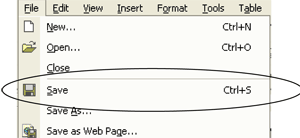

file menu in microsoft word

SO, SAVE YOUR WORK REGULARLY!!!!!!!!!!!

If you are on page 23 of your document and you want to get to the top of the first page, do not scroll laboriously through it, just press Ctrl + Home keys and you will go to the start of your document. Ctrl + End keys will take you to the very end of your document.

Published 19th Feb 2007

print

Advertisement

Advertisement

Article Information
Average Rating: 0
Explore This Topic

This article is part of the Technology topic. Click here to read articles, join discussions and more on this topic. Below are the latest articles in this topic.

Discuss This

Click here to start a discussion on this or Click here to read other discussions.

Contribute
Log in to post comments


Join GrownUps Free
By becoming a GrownUps member and part of the Community, you gain access to:
  • Enter Competitions
  • Go into regular prize draws
  • Play daily games
  • Join Discussion Groups
  • Find like-minded individuals and create lasting friendships
  • Receive special GrownUps offers and
  • Add you own articles of interest, recipes, pictures for fellow members to read and view.
All for FREE! So why not join now?

Register Now